> ## Documentation Index
> Fetch the complete documentation index at: https://berachain-422fce37-mintlify-1066267a.mintlify.site/llms.txt
> Use this file to discover all available pages before exploring further.

# Deposit & Withdraw

> Step-by-step: supply HONEY to a vault, stake for PoL rewards, unstake, and withdraw from Bend.

Follow these steps to deposit into and withdraw from a Bend vault.

## Requirements

* Wallet with \$HONEY
* Native \$BERA for transaction fees

<Tip>
  If you don't have \$HONEY, get it on [Berachain Hub](https://hub.berachain.com/swap) or
  [HoneySwap](https://honey.berachain.com).
</Tip>

## Depositing

Deposit \$HONEY to earn native lending yield and PoL reward yield.

<Steps>
  <Step title="Visit Bend and connect wallet">
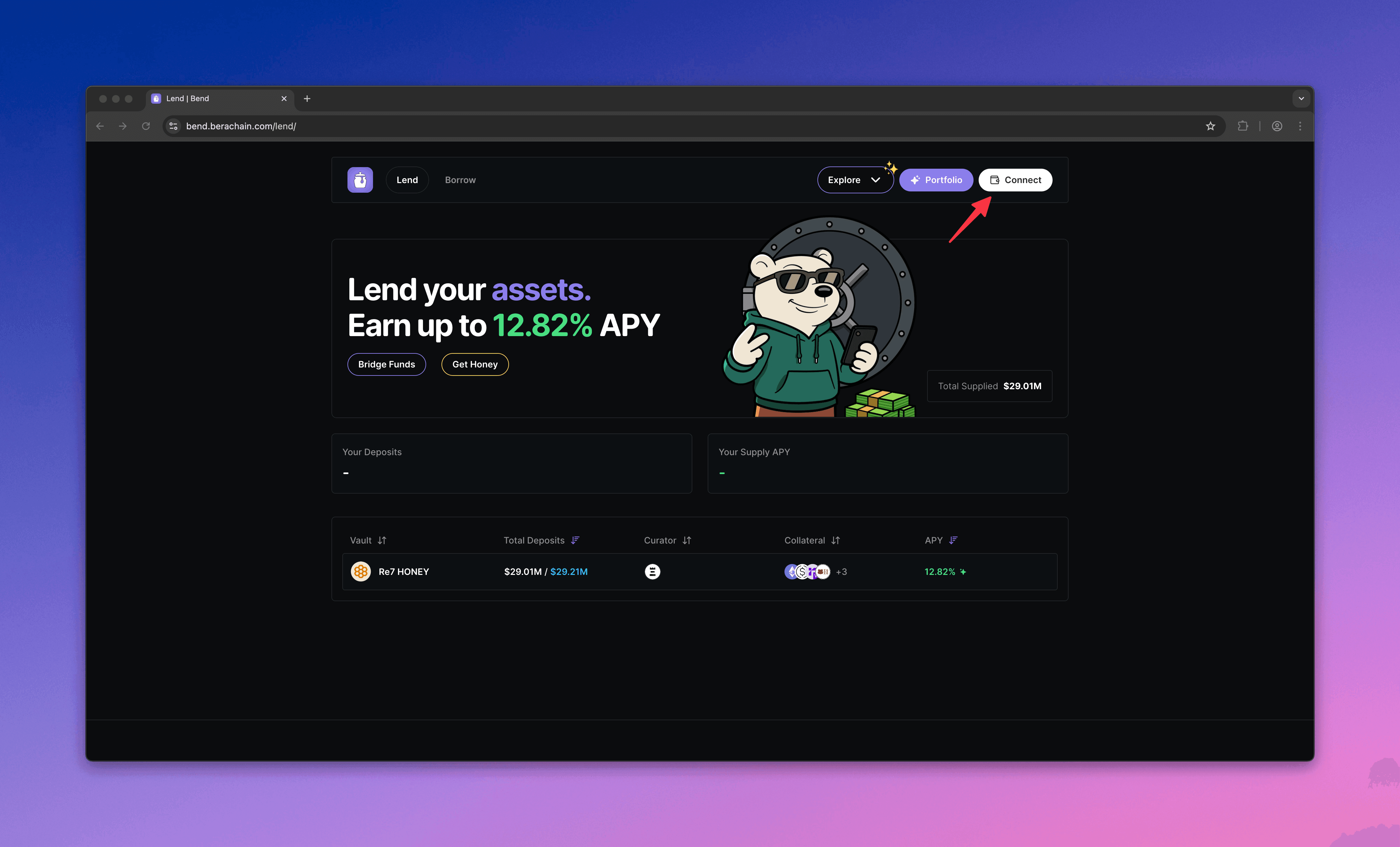
    Go to [Bend](https://bend.berachain.com/lend) and connect your wallet.
    <Frame>
      <img src="https://mintcdn.com/berachain-422fce37-mintlify-1066267a/2yeg5lmXXotdcONe/images/bend/deposit-connect-wallet.png?fit=max&auto=format&n=2yeg5lmXXotdcONe&q=85&s=a759324bff86618a36362a6fd2ab2faf" alt="Bend deposit connect wallet" width="4376" height="2646" data-path="images/bend/deposit-connect-wallet.png" />
    </Frame>
  </Step>

  <Step title="Choose a vault">
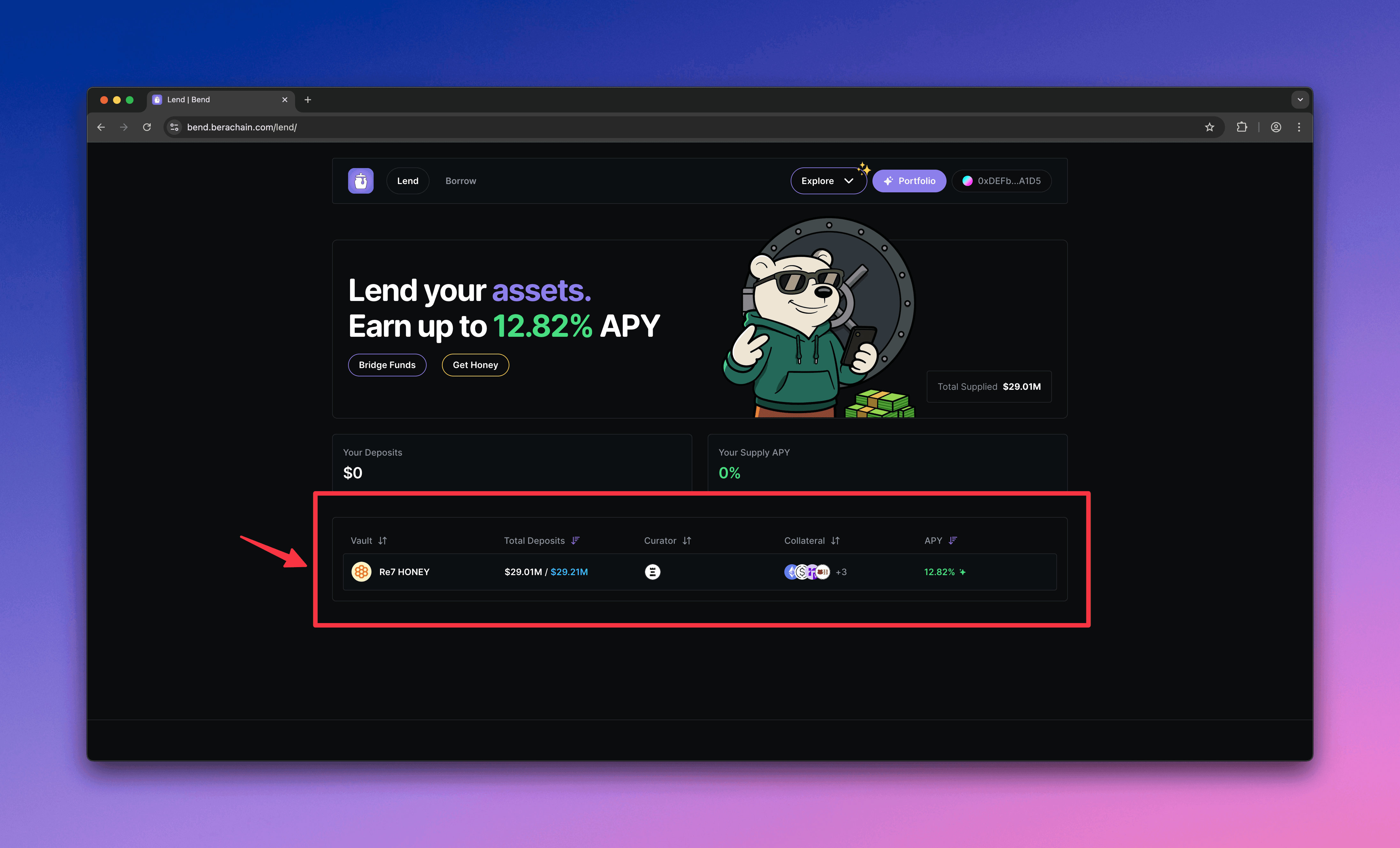
    Choose a vault to deposit \$HONEY into.
    <Frame>
      <img src="https://mintcdn.com/berachain-422fce37-mintlify-1066267a/2yeg5lmXXotdcONe/images/bend/deposit-choose-vault.png?fit=max&auto=format&n=2yeg5lmXXotdcONe&q=85&s=13341d42327926d7469c168e259368fa" alt="Bend choose vault" width="4384" height="2654" data-path="images/bend/deposit-choose-vault.png" />
    </Frame>
  </Step>

  <Step title="Configure deposit">
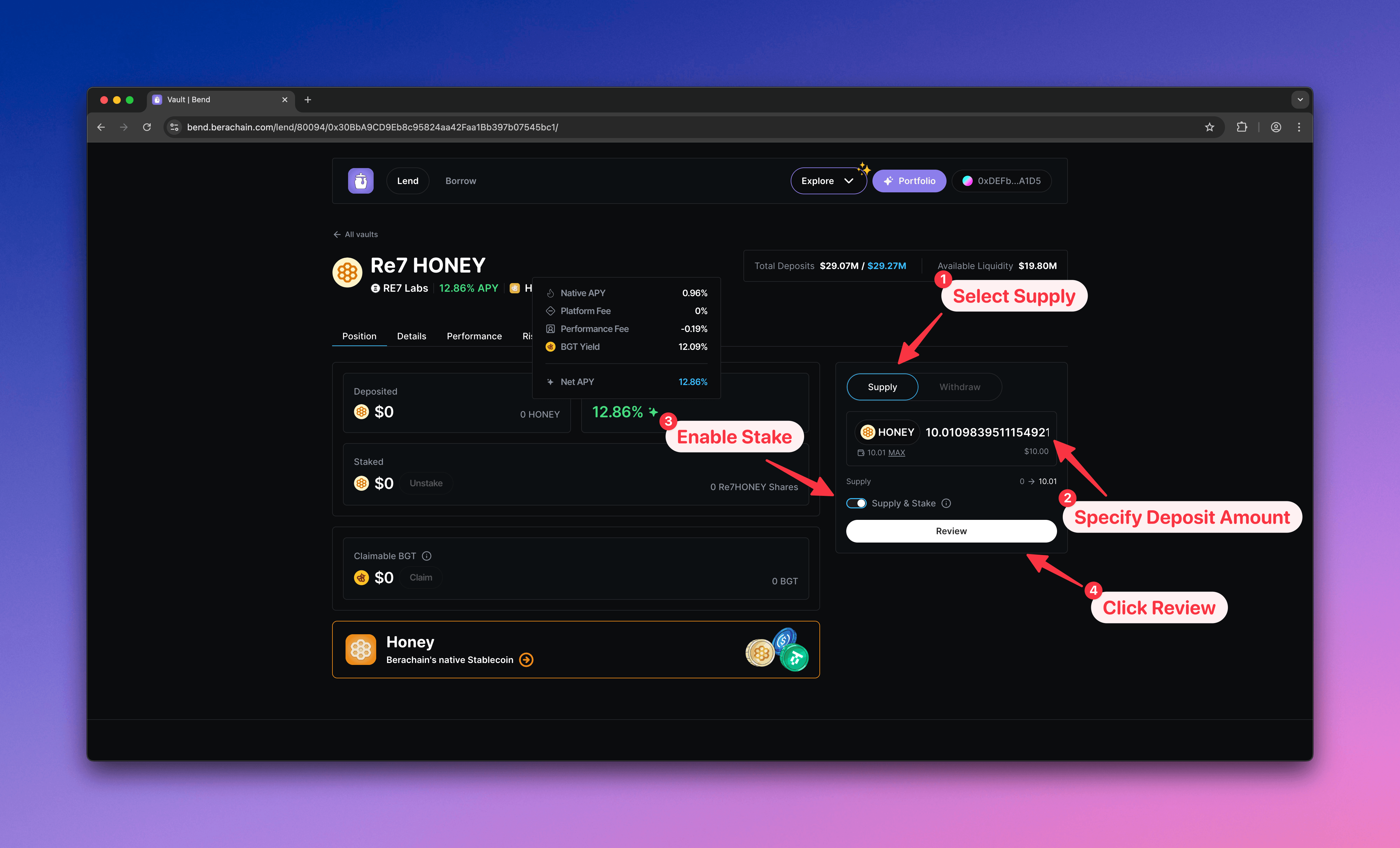
    1. Select **Supply**
    2. Enter the \$HONEY amount to deposit
    3. Choose **Stake** or **Supply & Stake** (recommended for PoL reward yield)
    4. Click **Review** to open the confirmation modal

    <Tip>
      You can enable **Supply & Stake** later if you skip it now.
    </Tip>

    <Frame>
      <img src="https://mintcdn.com/berachain-422fce37-mintlify-1066267a/2yeg5lmXXotdcONe/images/bend/deposit-configure-deposit.png?fit=max&auto=format&n=2yeg5lmXXotdcONe&q=85&s=bbe6c786abf4c1d39a8ed325c1e9dd49" alt="Bend configure deposit" width="4384" height="2654" data-path="images/bend/deposit-configure-deposit.png" />
    </Frame>
  </Step>

  <Step title="Approve, supply, and stake">
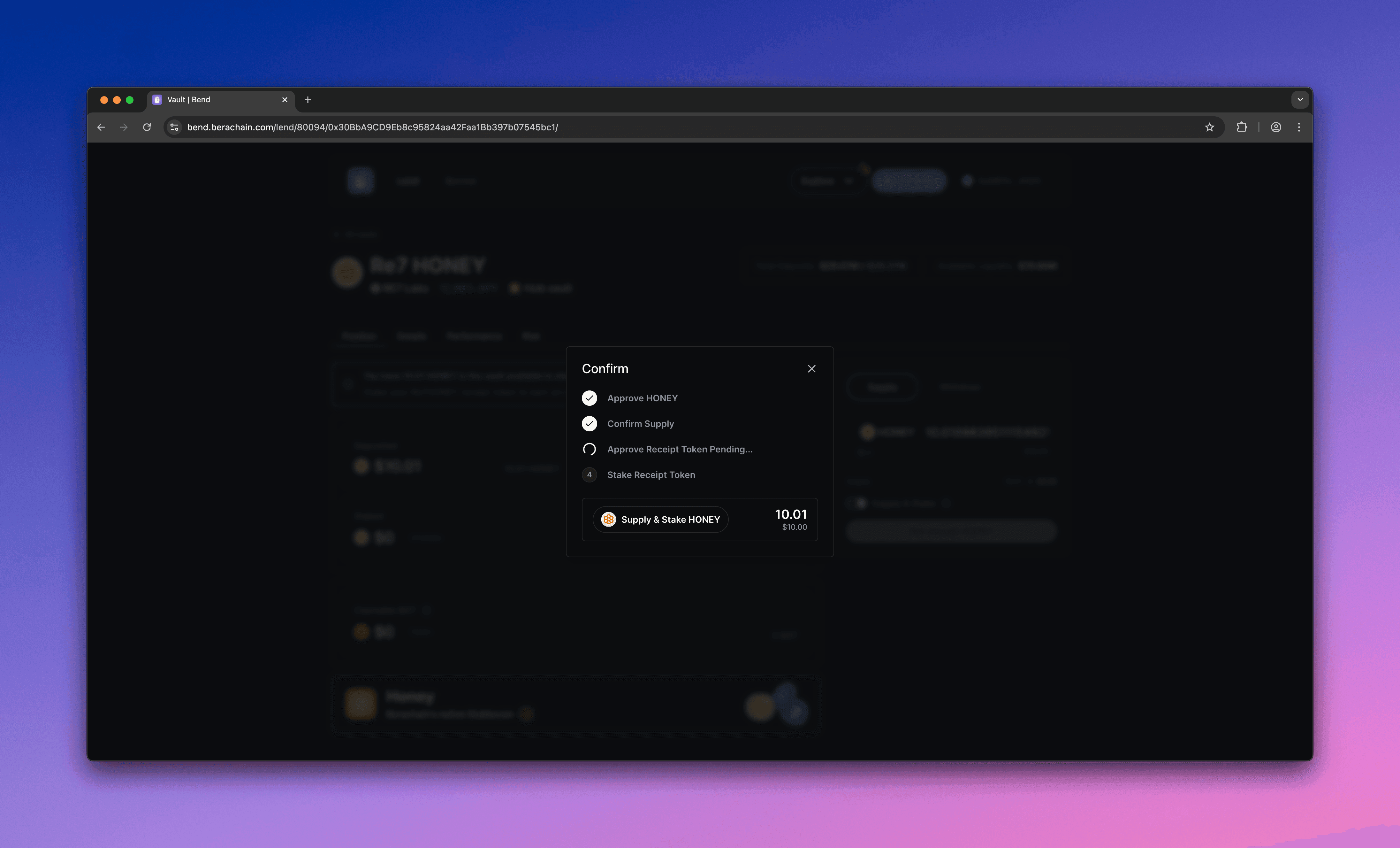
    Your wallet will prompt you to:

    1. Approve the vault to spend your \$HONEY
    2. Supply \$HONEY to the vault
    3. Receive receipt tokens
    4. Stake the receipt tokens in a Berachain PoL Reward Vault for reward yield
    <Frame>
      <img src="https://mintcdn.com/berachain-422fce37-mintlify-1066267a/2yeg5lmXXotdcONe/images/bend/deposit-supply-stake.png?fit=max&auto=format&n=2yeg5lmXXotdcONe&q=85&s=7a7986cb20e2c59f43d983354033e1c8" alt="Bend supply and stake" width="4384" height="2654" data-path="images/bend/deposit-supply-stake.png" />
    </Frame>

    <Frame>
      <img src="https://mintcdn.com/berachain-422fce37-mintlify-1066267a/2yeg5lmXXotdcONe/images/bend/deposit-successful-supply-stake.png?fit=max&auto=format&n=2yeg5lmXXotdcONe&q=85&s=294f4b696ee5a384f79e11eaa0a99add" alt="Bend successful supply and stake" width="4384" height="2654" data-path="images/bend/deposit-successful-supply-stake.png" />
    </Frame>

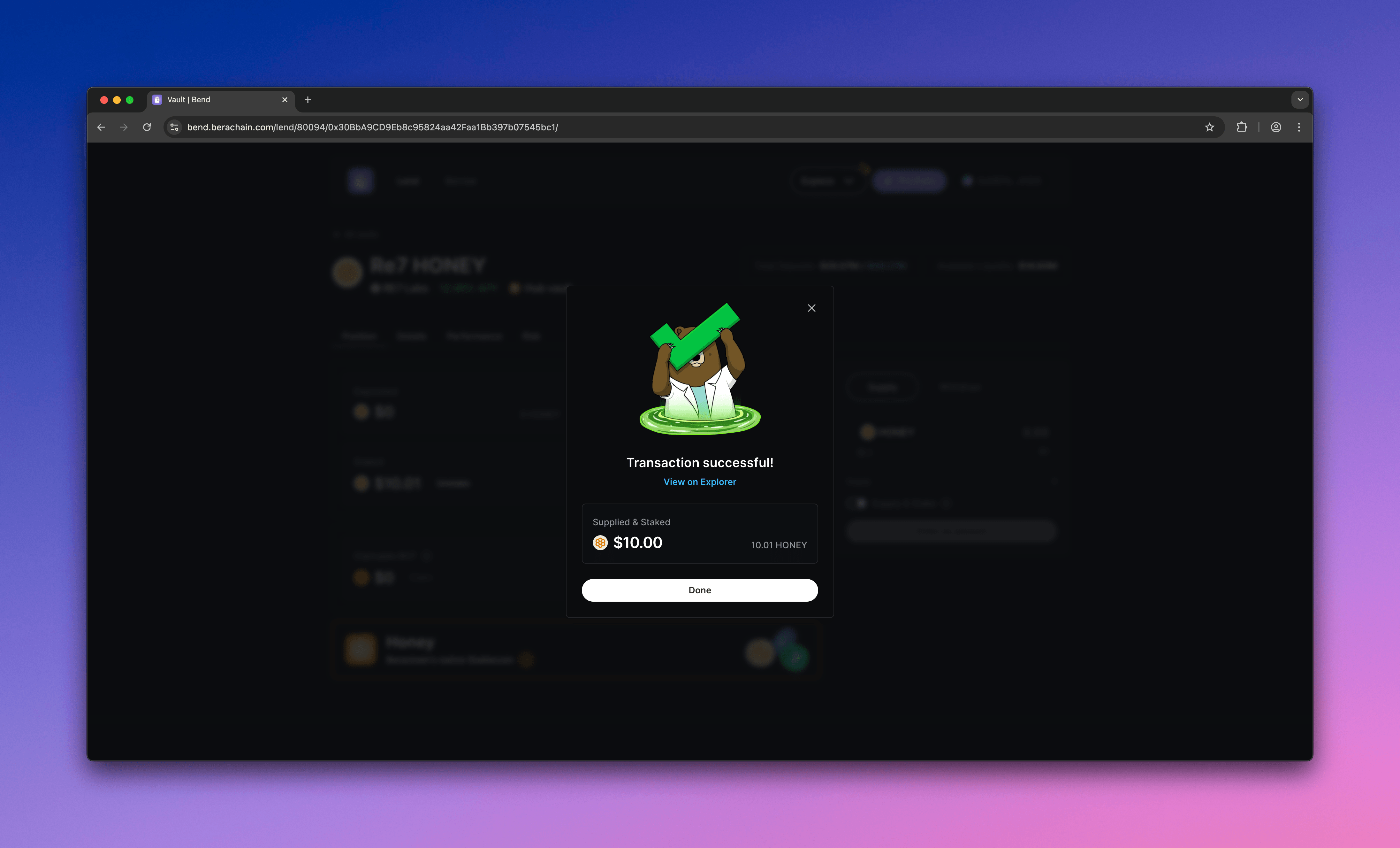
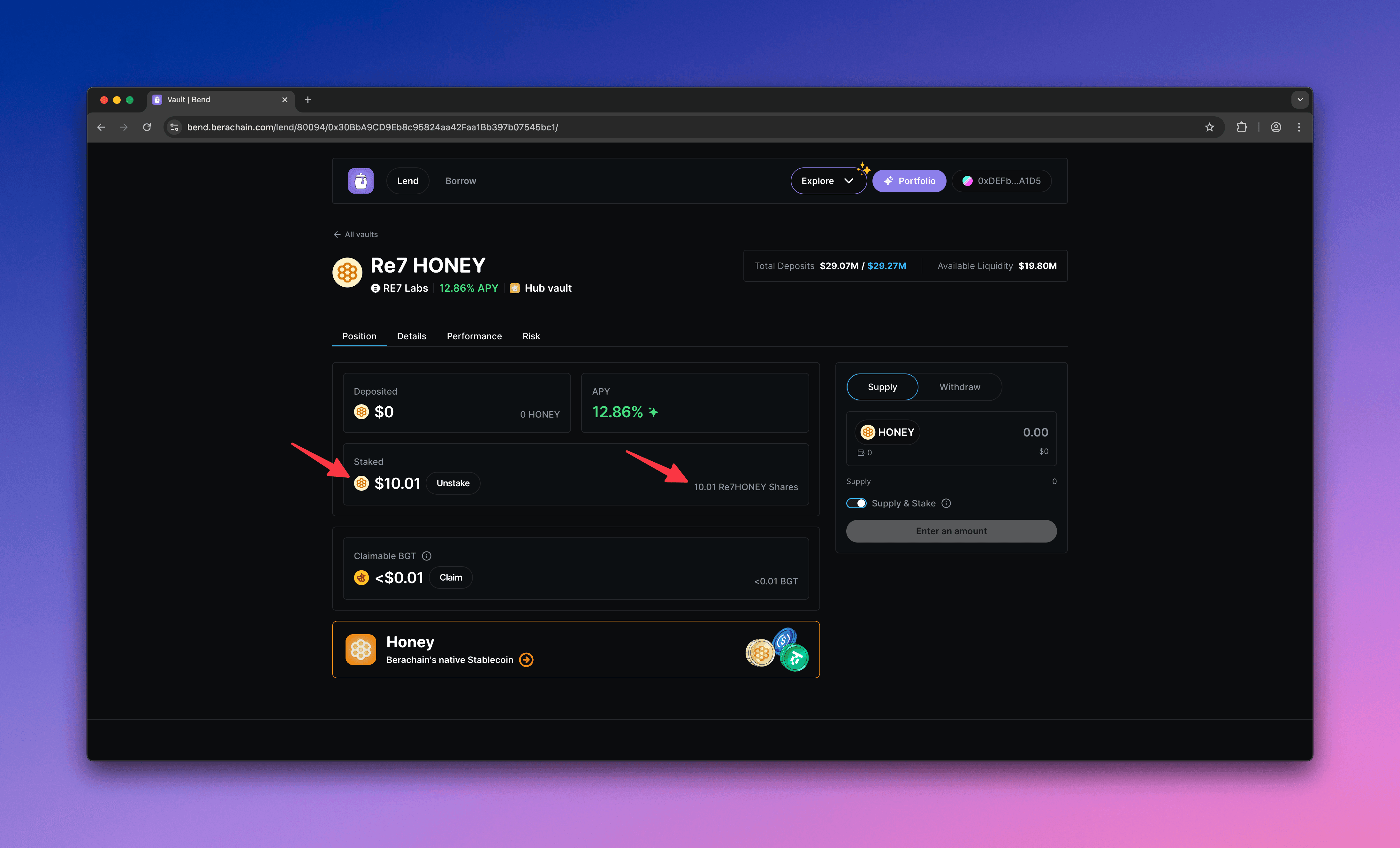
    You should see your deposited value (supplied and staked) and the receipt token amount.
    <Frame>
      <img src="https://mintcdn.com/berachain-422fce37-mintlify-1066267a/2yeg5lmXXotdcONe/images/bend/deposit-staked-receipt-tokens.png?fit=max&auto=format&n=2yeg5lmXXotdcONe&q=85&s=09da5a007e7565b9428682c66f4325be" alt="Bend staked receipt tokens" width="4384" height="2654" data-path="images/bend/deposit-staked-receipt-tokens.png" />
    </Frame>

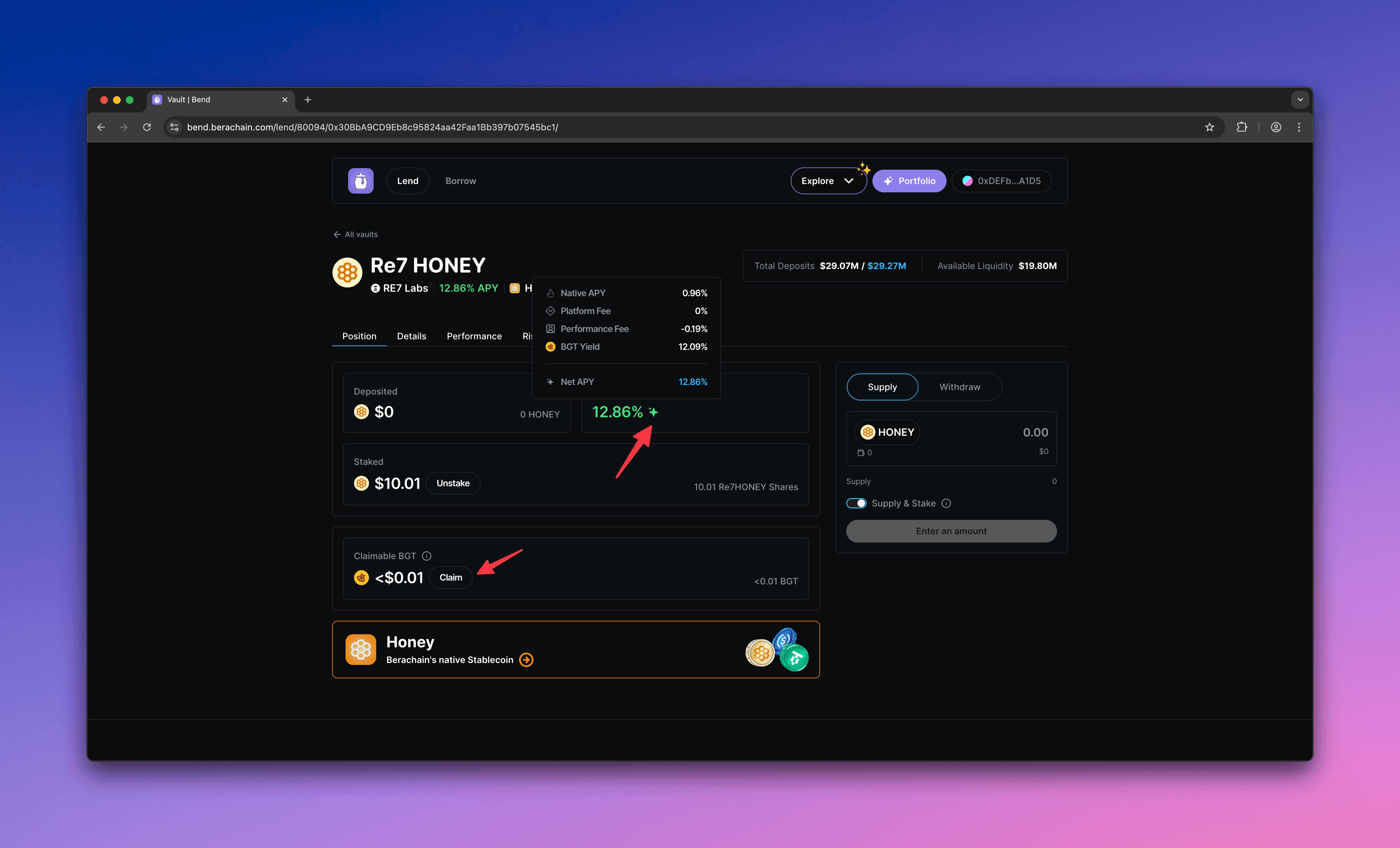
    With your deposit staked, you can claim PoL rewards.
    <Frame>
      <img src="https://mintcdn.com/berachain-422fce37-mintlify-1066267a/2yeg5lmXXotdcONe/images/bend/deposit-yields.png?fit=max&auto=format&n=2yeg5lmXXotdcONe&q=85&s=de5df8deb1120333f426a3c2d31a6765" alt="Bend deposit yields" width="4384" height="2654" data-path="images/bend/deposit-yields.png" />
    </Frame>
  </Step>
</Steps>

## Withdrawing

Unstake and withdraw your \$HONEY.

<Steps>
  <Step title="Configure withdrawal">
    In the vault you want to withdraw from:

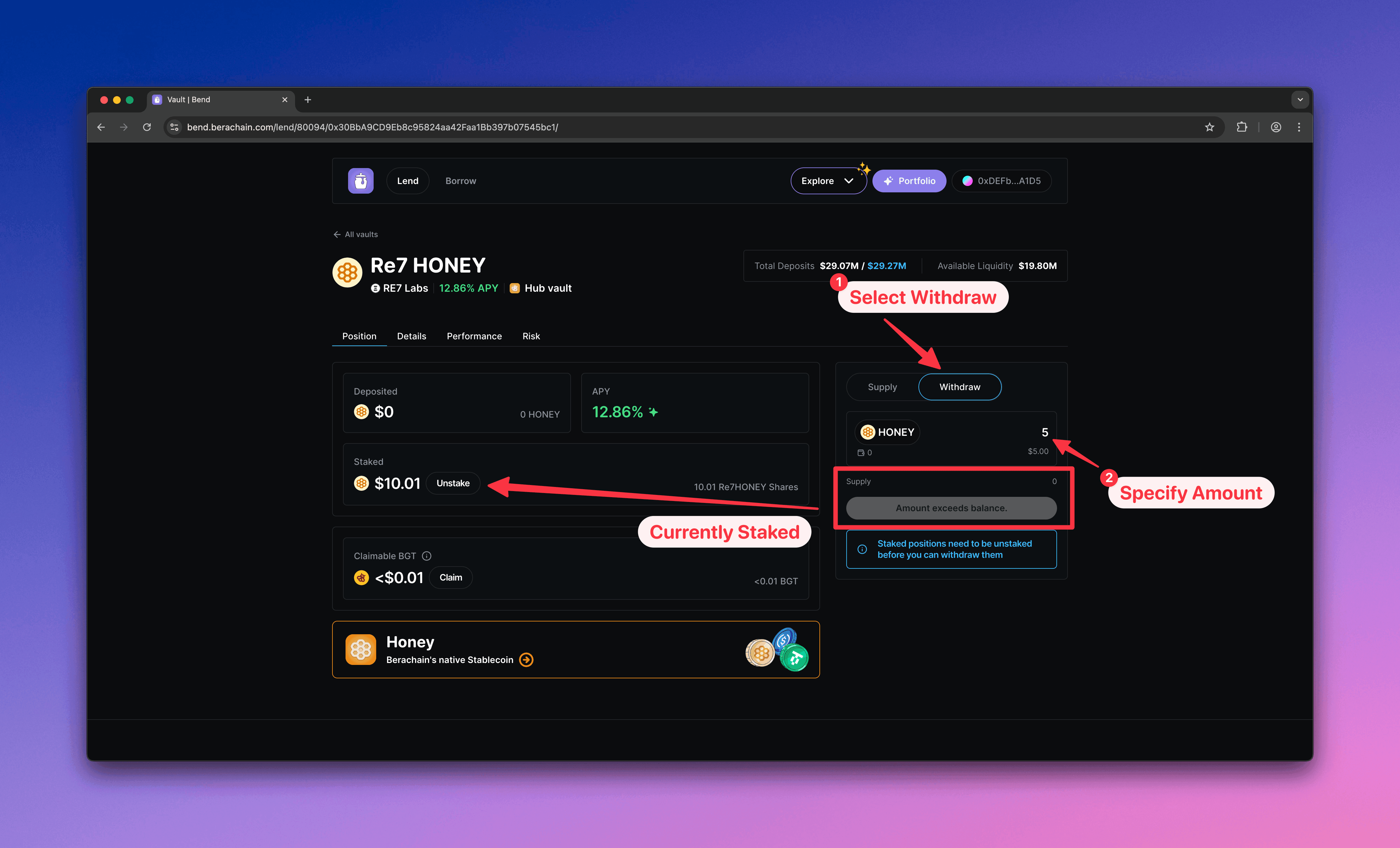
    1. Select **Withdraw**
    2. Enter the \$HONEY amount to withdraw

    <Tip>
      If your balance shows 0, your deposit is staked. Unstake first, then withdraw.
    </Tip>

    <Frame>
      <img src="https://mintcdn.com/berachain-422fce37-mintlify-1066267a/2yeg5lmXXotdcONe/images/bend/withdraw-configure-withdraw.png?fit=max&auto=format&n=2yeg5lmXXotdcONe&q=85&s=116b39ebbcb1f699a6f6d815373b0a73" alt="Bend configure withdrawal" width="4384" height="2654" data-path="images/bend/withdraw-configure-withdraw.png" />
    </Frame>
  </Step>

  <Step title="Unstake deposit">
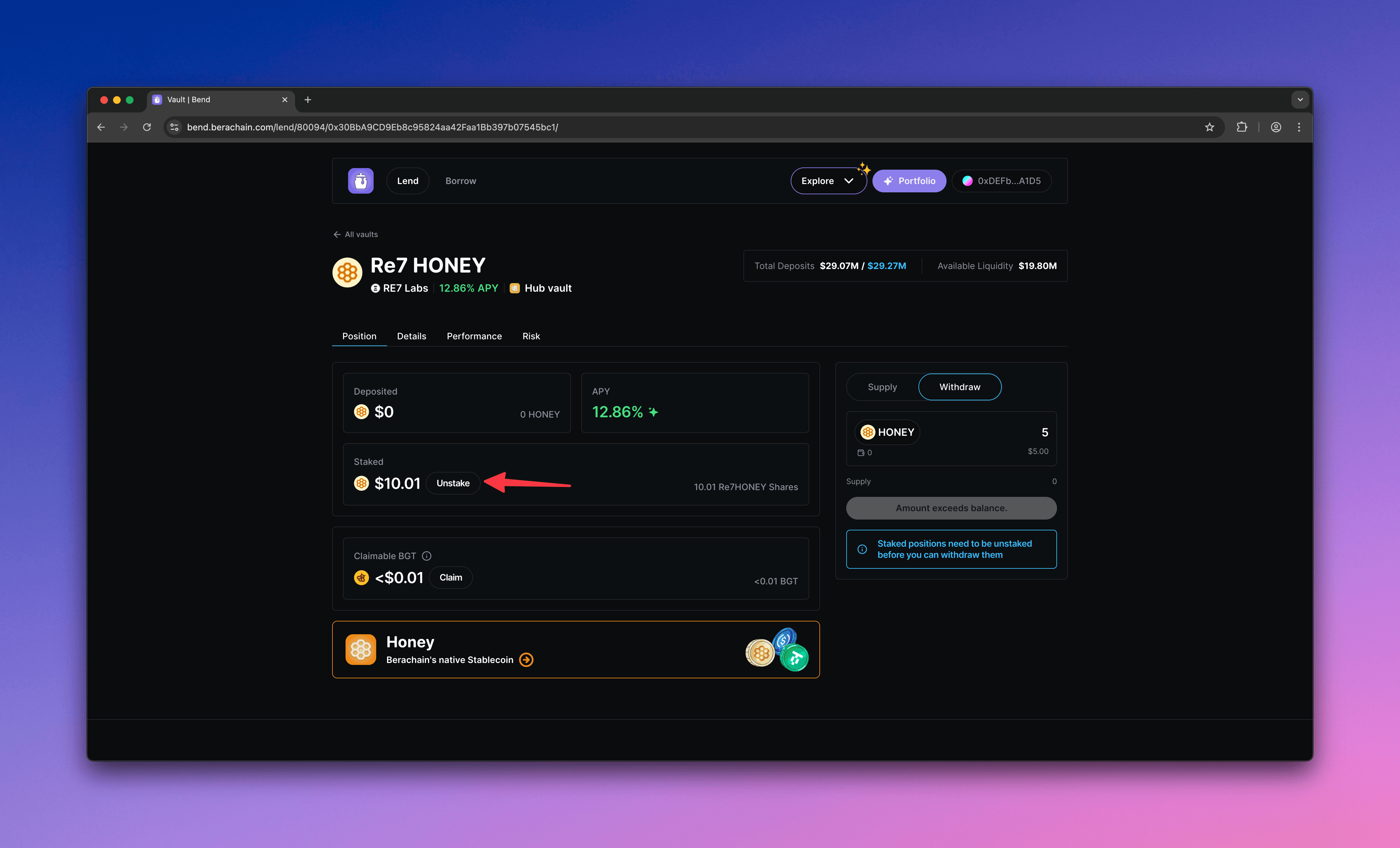
    Where your staked balance is shown, click **Unstake**.
    <Frame>
      <img src="https://mintcdn.com/berachain-422fce37-mintlify-1066267a/2yeg5lmXXotdcONe/images/bend/withdraw-unstake.png?fit=max&auto=format&n=2yeg5lmXXotdcONe&q=85&s=0a0b7efbfee4a31213f6093a6b142f52" alt="Bend unstake deposit" width="4384" height="2654" data-path="images/bend/withdraw-unstake.png" />
    </Frame>

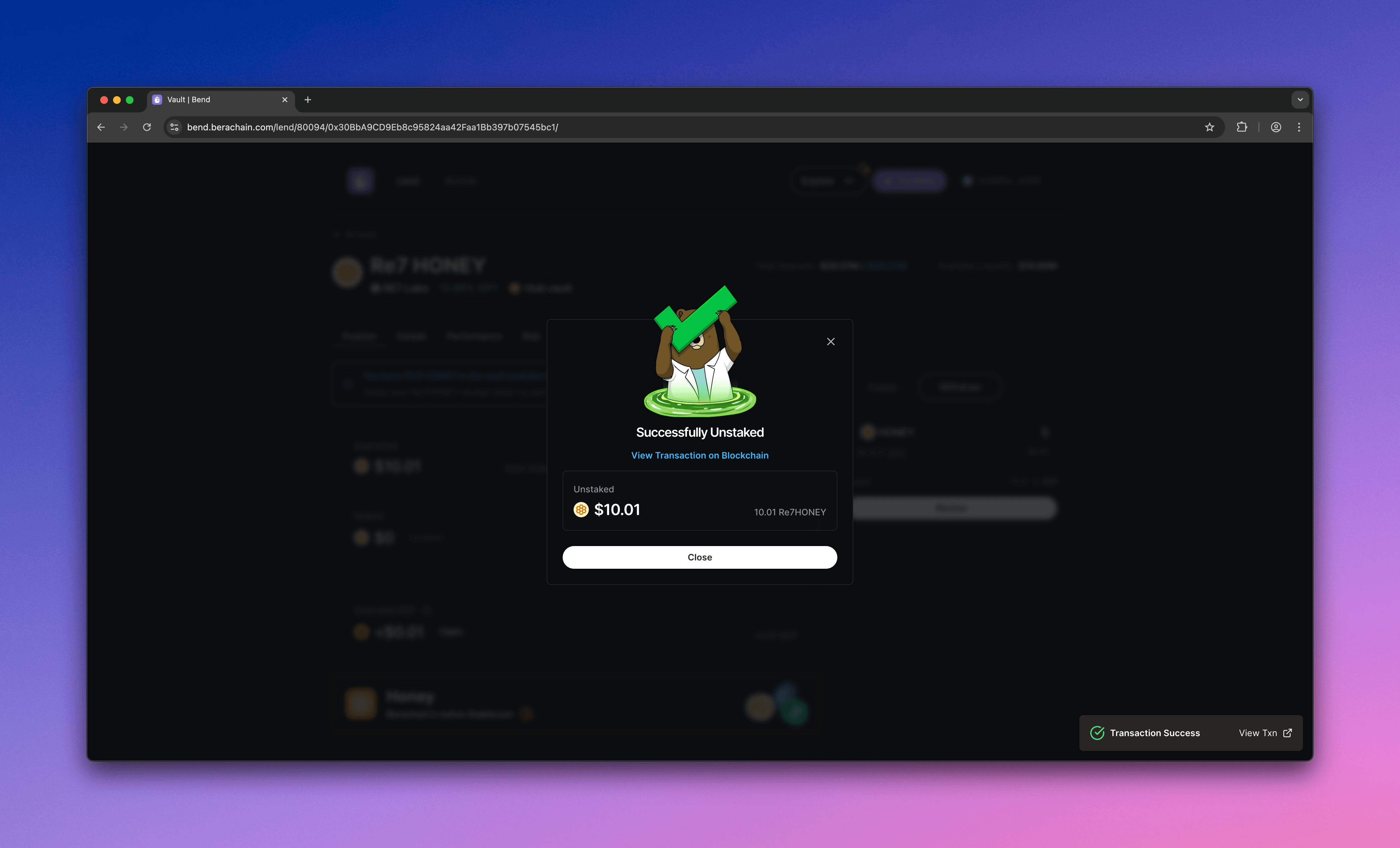
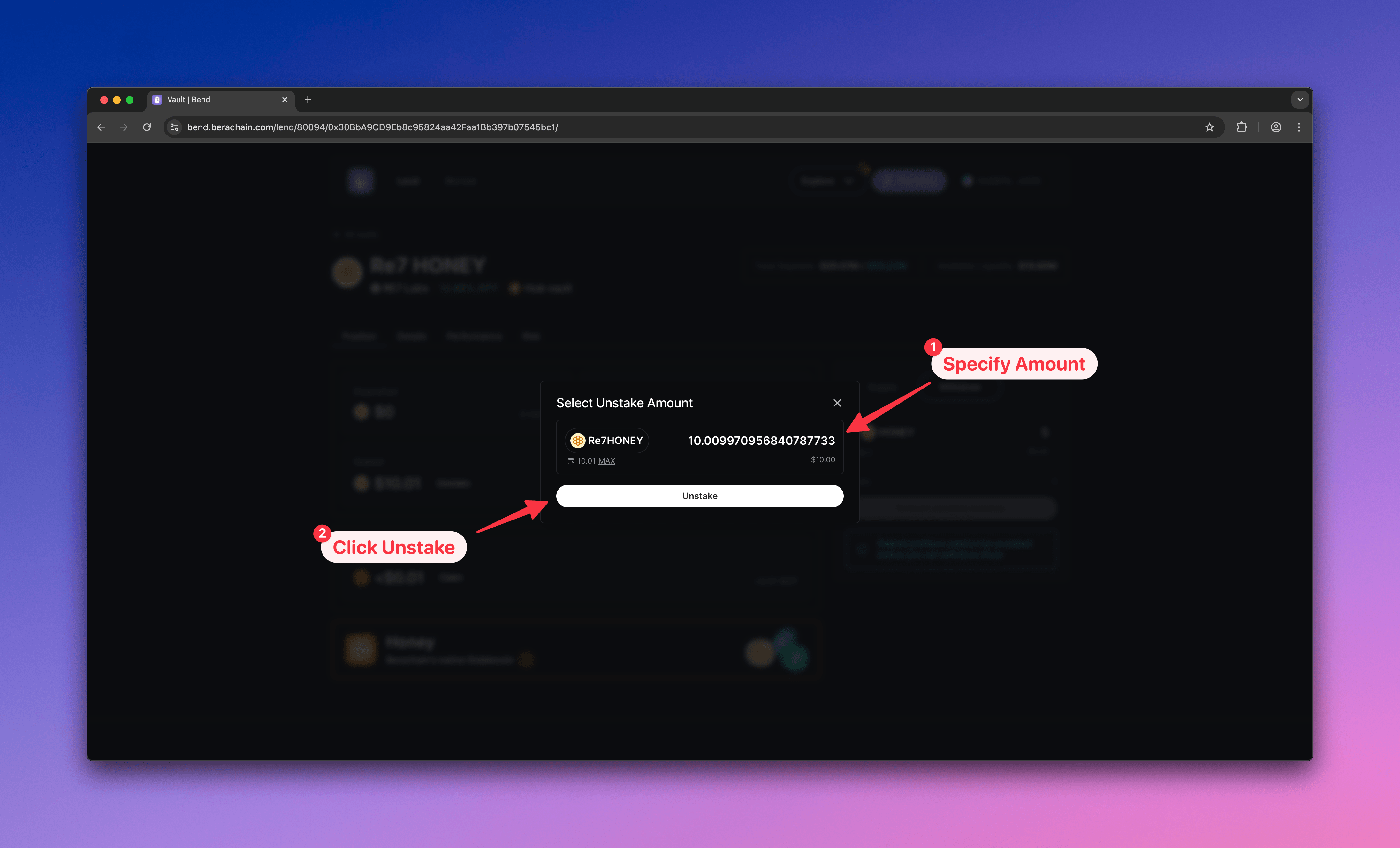
    Enter the amount to unstake and confirm.
    <Frame>
      <img src="https://mintcdn.com/berachain-422fce37-mintlify-1066267a/2yeg5lmXXotdcONe/images/bend/withdraw-confirm-unstake.png?fit=max&auto=format&n=2yeg5lmXXotdcONe&q=85&s=24268104438d7566e4eda90e9ab5c25a" alt="Bend confirm unstake" width="4384" height="2654" data-path="images/bend/withdraw-confirm-unstake.png" />
    </Frame>

    <Frame>
      <img src="https://mintcdn.com/berachain-422fce37-mintlify-1066267a/2yeg5lmXXotdcONe/images/bend/withdraw-successfully-unstaked.png?fit=max&auto=format&n=2yeg5lmXXotdcONe&q=85&s=81fb5aeba5078783804afe20aca9dc8d" alt="Bend successfully unstaked" width="4384" height="2654" data-path="images/bend/withdraw-successfully-unstaked.png" />
    </Frame>
  </Step>

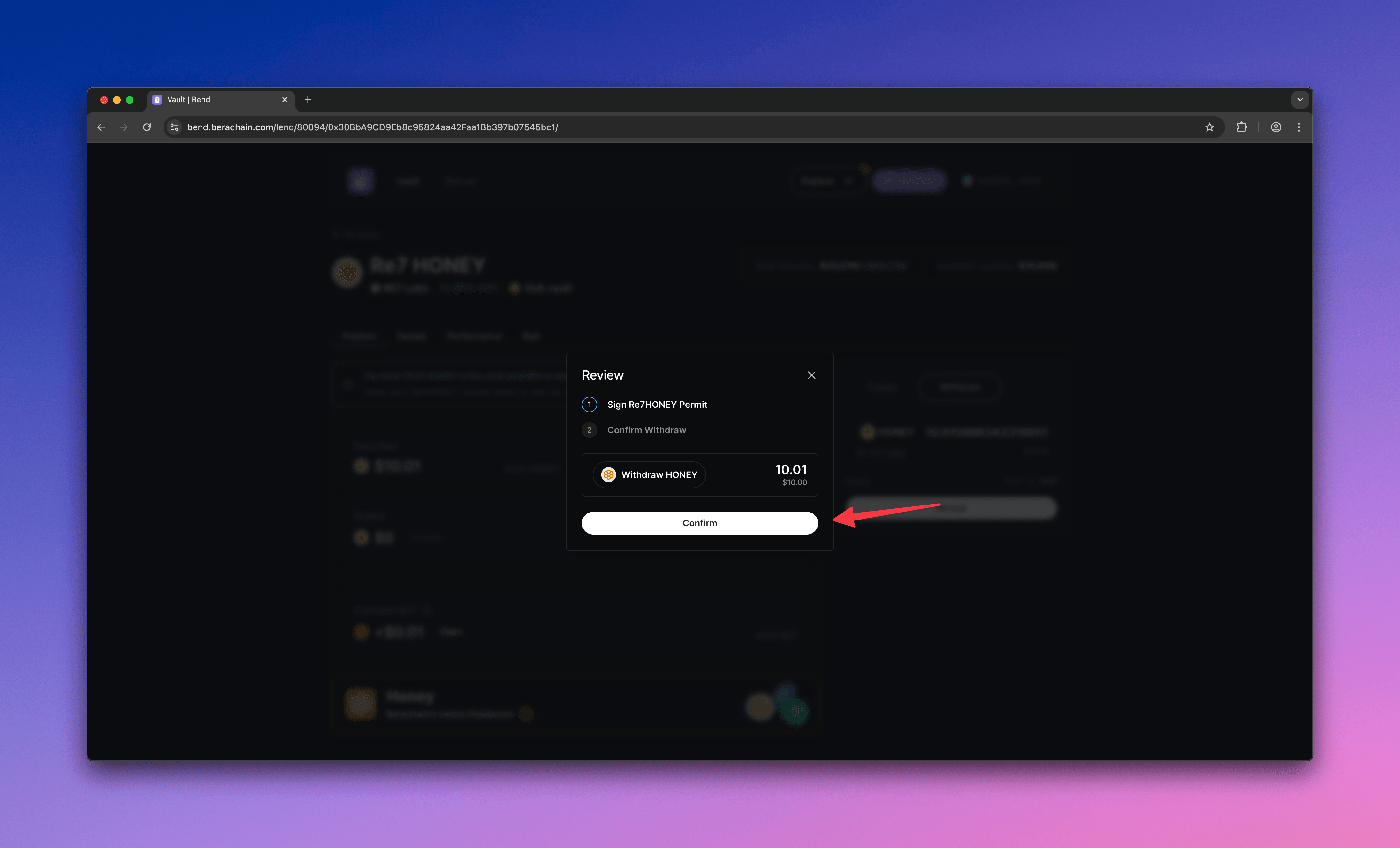
  <Step title="Withdraw deposit">
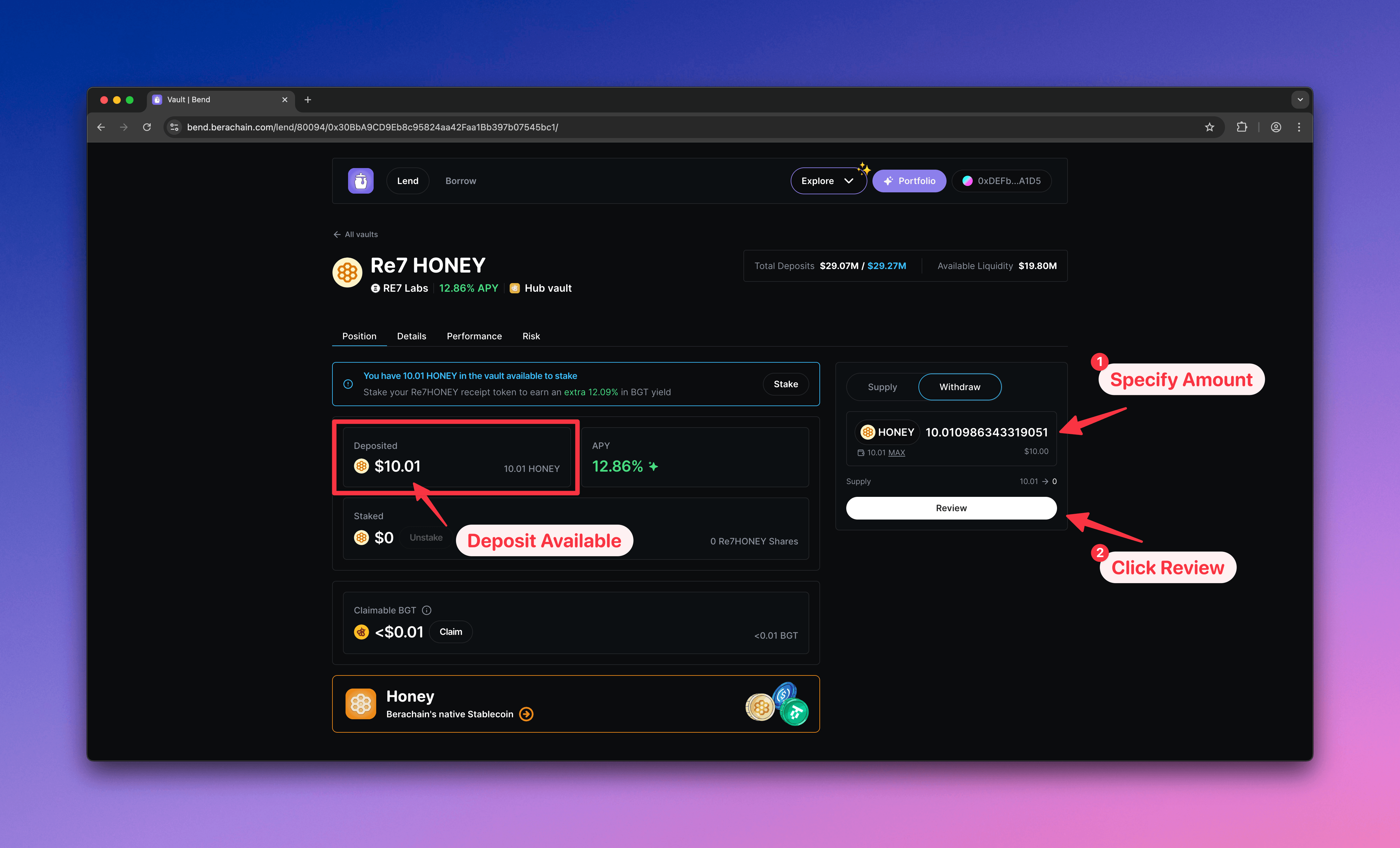
    After unstaking, your balance appears under **Deposited**. Withdraw from there.

    1. Enter the \$HONEY amount to withdraw
    2. Select **Withdraw**
    <Frame>
      <img src="https://mintcdn.com/berachain-422fce37-mintlify-1066267a/2yeg5lmXXotdcONe/images/bend/withdraw-specify-amount.png?fit=max&auto=format&n=2yeg5lmXXotdcONe&q=85&s=ac94b21aff2001542ad472f770ba1408" alt="Bend specify withdrawal amount" width="4384" height="2654" data-path="images/bend/withdraw-specify-amount.png" />
    </Frame>

    Confirm the withdrawal in your wallet.
    <Frame>
      <img src="https://mintcdn.com/berachain-422fce37-mintlify-1066267a/2yeg5lmXXotdcONe/images/bend/withdraw-confirm-withdrawal.png?fit=max&auto=format&n=2yeg5lmXXotdcONe&q=85&s=0ea5c1a404f794e57cb466669f9daf24" alt="Bend confirm withdrawal" width="4384" height="2654" data-path="images/bend/withdraw-confirm-withdrawal.png" />
    </Frame>

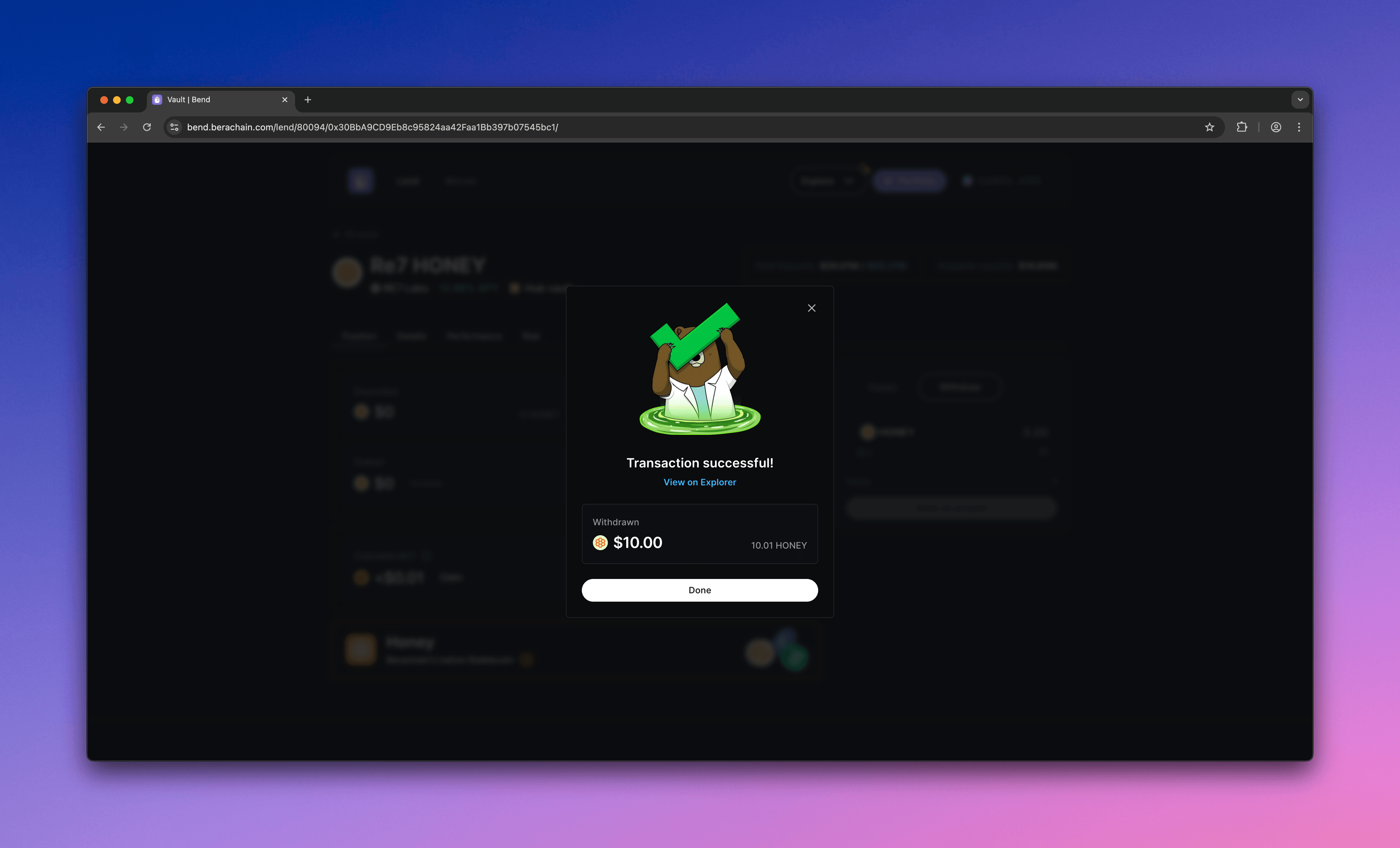
    When complete, your \$HONEY is back in your wallet.
    <Frame>
      <img src="https://mintcdn.com/berachain-422fce37-mintlify-1066267a/2yeg5lmXXotdcONe/images/bend/withdraw-successful-complete.png?fit=max&auto=format&n=2yeg5lmXXotdcONe&q=85&s=8c1a2f561a99b5a56b604f18b73a22f1" alt="Bend successful withdrawal" width="4384" height="2654" data-path="images/bend/withdraw-successful-complete.png" />
    </Frame>
  </Step>
</Steps>